
Free download
Run the numbers before you buy a rental.
The STR Deal Analyzer is a free Excel and Google Sheets workbook. Enter a property once, give it three revenue cases, and it answers the question that matters most: does it still work in a bad year?
Three cases, side by side
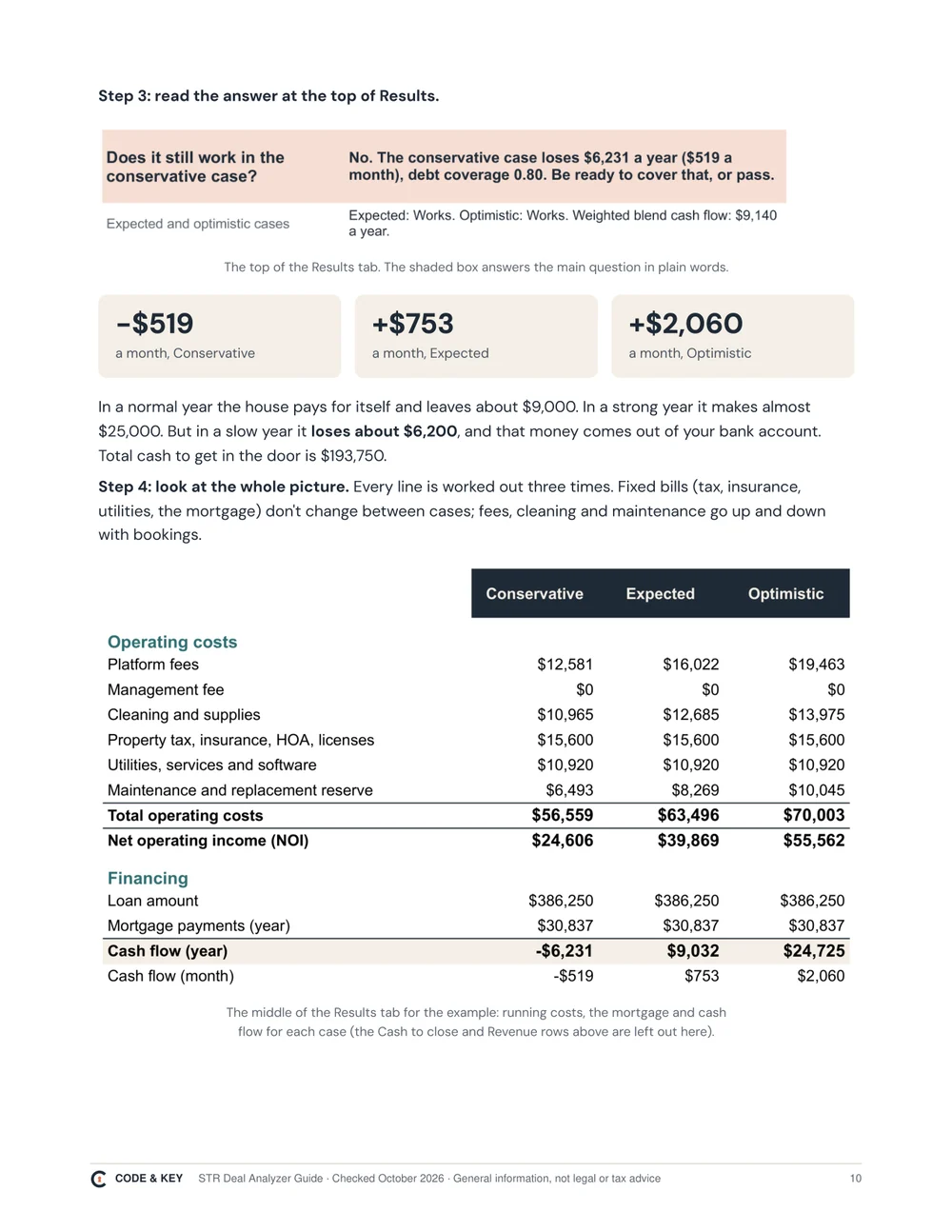
An average hides the year that hurts. The analyzer runs every deal three times and gives each case its own verdict. These are the numbers from the example that comes in the workbook: a made-up 4-bedroom pool home at $515,000, 25% down at 7%, self-managed.
-
Conservative
A slow year: lower rate, fewer nights. Your first year with no reviews looks like this.
- Nightly rate
- $345
- Booked
- 55%
- Cash flow a month
- -$519
Loses money
-
Expected
A normal year, from the middle of comparable rentals near you.
- Nightly rate
- $385
- Booked
- 63%
- Cash flow a month
- +$753
Works
-
Optimistic
A strong year. Only if your place will beat most of the comps.
- Nightly rate
- $430
- Booked
- 70%
- Cash flow a month
- +$2,060
Works
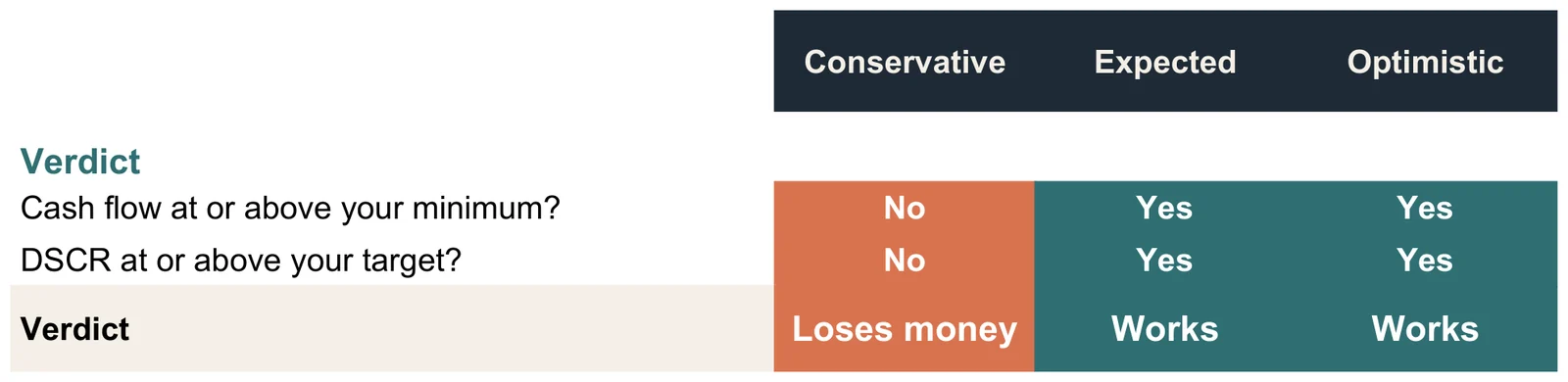
Does it still work in a bad year? In this example, no: the slow year costs about $6,200 out of pocket, even though the averaged number says the house earns $9,140 a year.
What it looks like
Real screenshots of the workbook with the example filled in. You type in the yellow cells; everything else is worked out for you.
On a phone, swipe each screenshot sideways to see all of it.


What you get
- The workbook (.xlsx). Four tabs: Start Here, Inputs, an optional Monthly tab for seasonal markets, and Results with cash flow, cash-on-cash return, cap rate, debt coverage and break-even occupancy for every case.
- The 14-page guide (PDF). Beginner friendly, Mac and Windows: opening the file, every input in plain words, where to find each number, how to pick the three cases, a full worked example and the red flags to walk away from.
- A filled-in example so you can see it working before you type anything.
Who it's for
- Anyone looking at a house to rent by the night, before making an offer.
- Owners deciding whether a short-term rental beats a long-term lease on a house they already have.
- Co-hosts checking whether an owner's numbers can carry a management fee.
Not for hotels, apartment buildings or long-term rental underwriting. It's a calculator and a method, not investment advice, and it doesn't check your city's rules.
Questions
Is it really free?
Yes. You give us an email address and we send the workbook and the guide. There's no card, no trial and nothing to cancel.
What emails will I get?
The download link right away, then four short emails over about two weeks: how to pick your three cases, a first-30-days checklist if you buy, a worked example with common mistakes, and one offer on our host kits. Every email has an unsubscribe link that works right away.
What do I need to open it?
Microsoft Excel (Mac or Windows) or Google Sheets, which is free. The guide shows both, step by step. Apple Numbers can open it, but we only tested Excel and Google Sheets.
Where do the numbers come from?
From you. The guide shows where to find each one: comparable listings for nightly rate and occupancy, a lender's quote, an insurance quote for short-term rental use, and the county property appraiser for taxes. The workbook does the math; it doesn't guess your market.
Is this investment advice?
No. It's a calculator and a method. It can't tell you whether to buy a property, and it doesn't check local rules. Talk to a lender, an accountant and your city before you commit.
My link expired. Can I get a new one?
Yes. Links work for 7 days and 5 downloads. Fill in the form on this page again with the same address and we'll send fresh ones.